
Product Trials
Trial List
- Cloud Monitoring
- Monitoring Android Client
- Monitoring Standard PC Client
- Monitoring WeChat Client
- Matrix Visual Android Client


Monitoring Android Client Online Trial Steps
1. Download the Monitoring Android Client installation package.NdtMcMobileClientApp.apk
2. Copy the downloaded NdtMcMobileClientApp.apk file to an Android tablet and install it. After successful installation, an icon will be generated as shown below:
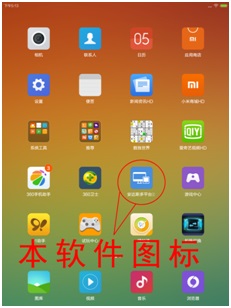
3. Double-tap the icon to enter the login page. For first-time use, you need to set the IP address. Tap "Settings" in the upper-right corner, then tap "IP", as shown below:
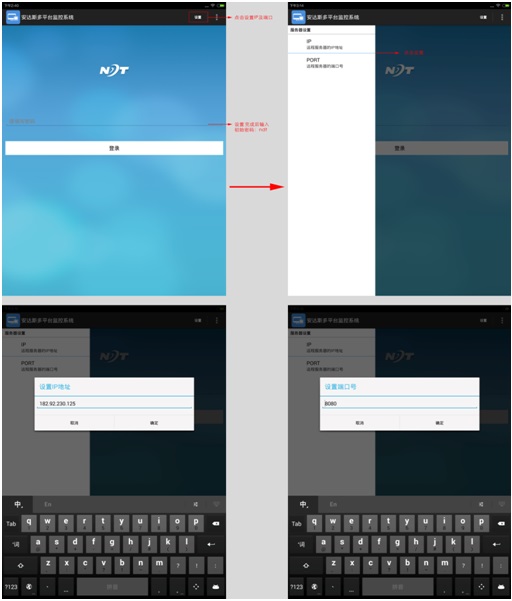
In the "Set IP Address" window, enter the server IP address, confirm and close the window to return to the login page. Note that the port number should be 18080.
4. On the login page, enter the password "NDT" and tap the "Login" button. After successful login, the page will display as shown below:
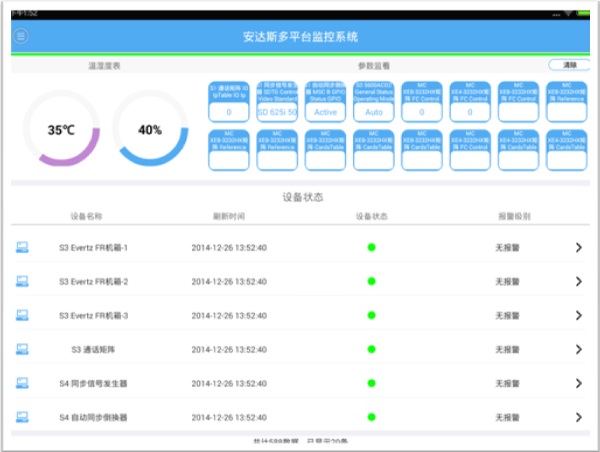
You can now start trying the Monitoring Android Client.
5. For detailed instructions, please download and refer to the "Monitoring Android Client User Manual”。